
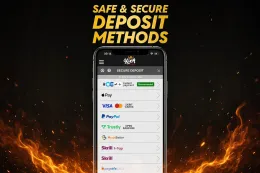
To make a King Casino deposit, log in, open the cashier, choose a payment method and enter an amount of at least £10. The steps above show the order, and the table above shows which methods work for deposits.
Before you start, have your login details to hand, along with the payment method you plan to use, in your own name. Because King Casino requires verification, keep your photo ID and a proof of address within reach as well.
This page covers what happens behind those steps, what to do when a payment does not go through, and how to keep control of your account and spending.
What happens behind a deposit
Checks before you can pay in
King Casino holds a UK licence, and UK-licensed operators must verify your age and identity before you can deposit or play. You must be 18 or over, and the name on your account has to be your real name. The documents involved are Photo ID and Utility bill or bank statement (proof of address). If you have not yet registered, the sign-up guide covers the details you will be asked for. The verification guide covers the documents in more detail.
Choosing a method
The cashier offers Visa / Mastercard, PayPal, Trustly, Skrill, Paysafecard and Bank transfer. The methods differ in how they work, and the table above shows which of them accept deposits and which accept withdrawals.
- Visa / Mastercard: use a debit card. Credit cards cannot be used for gambling in Great Britain, so a credit card will be declined or should not be chosen at all.
- PayPal and Skrill: these e-wallets sit between your bank and the casino. They have their own balance, limits and login, so check the wallet is funded before you open the cashier.
- Trustly: this is an online banking payment, so you will confirm the payment with your own bank.
- Paysafecard: this is a prepaid voucher method. You can only pay in what the voucher holds.
- Bank transfer: this goes directly from your bank account. Check the methods table above to see how it is marked for deposits.
Visa / Mastercard, PayPal, Trustly and Skrill are listed for both deposits and withdrawals. If you plan to take money out later, it helps to know which method you will use. The withdrawals guide covers that side.
Matching names
Use only payment methods registered in your own name. A card, wallet or bank account belonging to someone else is a common reason for a payment to be refused, and it can cause problems later when you want to withdraw. The name on the payment method should match the name on your account and on your ID.
The minimum and what you see in the cashier
The lowest amount you can deposit is £10. Enter the amount you intend to pay in and read the confirmation screen before you approve it. Your bank, card issuer or e-wallet may ask you to approve the payment on its own page or in its own app. That is normal for online payments and is part of the confirmation step.
Deposits and offers
If you are depositing with an offer in mind, read its conditions on the welcome bonus page before you confirm the payment. Wagering, the minimum deposit and the time limit are all set out there, and T&Cs apply. The cashier amount and the offer terms are separate things, so check both.
18+ · T&Cs apply
When a deposit does not go through
The payment is declined
Start with the simple causes. Check that the amount is at least £10, that the balance on your card, wallet or bank account covers it, and that the card details are typed correctly. Also check that the card has not expired and that the name on it matches your account.
Some banks and card issuers block gambling payments, or ask you to confirm them in the banking app. If the decline comes from your bank, the casino cannot override it, so check the app or call your bank. If you are using a credit card, it will not work for gambling in Great Britain. Switch to a debit card or another listed method.
If one method keeps failing, try a different one from the table above rather than repeating the same attempt many times. Repeated declined attempts can make your bank more cautious.
Money left your account but is not in your casino balance
First check whether the payment was completed or is only pending. Your bank statement, card app or e-wallet history will show the status. If the payment is pending, wait for your bank or wallet to finish it before you try again, or you may pay twice.
If the money has clearly been taken and your casino balance has not changed, contact support. Give them the amount, the date and time, the payment method and any transaction reference. A screenshot of the payment in your banking app or wallet helps.
Your payment method is not accepted
Not every listed method works in both directions. Paysafecard and bank transfer, for example, are marked differently in the methods table above. If the method you want is not shown as available for deposits, choose another from the table.
A document is rejected
If King Casino asks for documents and one is rejected, the cause is usually the image. A photo ID should show all four corners, with every detail readable and no glare. A proof of address, such as a utility bill or bank statement, should show your full name and address clearly. Make sure the name matches your account and the document is not expired.
Do not edit, crop out or alter a document, and do not use someone else's. Send a clearer copy instead. The verification guide explains the documents in more detail.
You cannot log in to deposit
If you have forgotten your password, reset it through King Casino's own website or app, never through a link sent by a third party. If that does not work, contact support. The login guide covers access problems in more detail.
Contacting support
Support is available 24/7 by live chat and email. There is no phone line. Chat is usually the more practical choice for a payment that is in progress, and email suits cases where you want to attach screenshots or documents. The contact page gives the details. Keep your account name, the amount and the payment reference ready, and never send your full card number or password.
Keeping your account and spending under control

Log in only on King Casino's own website or app. This site has no login or payment form. Go to the casino through visit King Casino or by using its app, and check that you are on the right page before you enter your password. Do not follow links in unexpected emails or messages, and never share your password or a verification code with anyone, support staff included.
Use a strong, unique password. A password you do not use anywhere else limits the damage if another site is breached. If your e-wallet or banking app offers extra security, switch it on.
Set a deposit limit before you pay in. Choose a figure from money you can afford to lose, and treat it as a ceiling rather than a target. The safer gambling page explains limits, time-outs and GAMSTOP, which covers all UK-licensed online operators.
Keep your documents ready. Clear scans of your photo ID and proof of address, stored somewhere safe, save you a delay if King Casino asks for them. Make sure the name and address match what you entered when you registered.
Check each payment before you confirm it. Read the amount, the method and the name on the confirmation screen. A wrong amount is easier to catch before you approve than afterwards.
Keep your own records. Your bank statement or e-wallet history is a useful record of what you have paid in. If you notice a payment you do not recognise, tell your bank and contact King Casino support straight away.
If you want to read more about the casino itself, see whether King Casino is safe. If your gambling is causing you concern, GamCare offers support.